Integrating a payment plugin with UCP
This page walks you through making an existing Shopware payment plugin
3. Integrating a payment plugin with UCP
This page walks you through making an existing Shopware payment plugin (Stripe, Mollie, Adyen, PayPal, Klarna, …) appear as a UCP payment handler so AI agents can pay through it on behalf of buyers.
The payment plugin keeps its existing PaymentHandlerInterface for the
storefront. To opt into UCP you implement one additional interface
and tag a service.
3.1 The Trust Triangle (why an extra interface?)
UCP's payment architecture is built around a Trust Triangle between the business (your shop), the platform (the AI agent), and the payment credential provider (the PSP behind your payment plugin). The agent never touches the buyer's raw payment credentials; it only ever holds an opaque token issued by the PSP. The token then flows to your shop, which uses it through your existing PSP integration to capture funds.
sequenceDiagram
    participant Buyer
    participant Agent as Platform agent
    participant PSP as PSP<br/>(Stripe, Mollie, …)
    participant Shop as Shopware shop
    participant Plugin as Your payment plugin

    Note over Agent,PSP: Tokenisation happens here, never on the shop
    Buyer->>Agent: "Pay with card ending 4242"
    Agent->>PSP: Tokenise raw PAN
    PSP-->>Agent: opaque token (e.g. tok_visa_123)

    Note over Agent,Shop: Token flows to the shop via UCP
    Agent->>Shop: POST /ucp/v1/checkout-sessions/{id}/complete<br/>{ instruments: [{ handler_id: "com.psp.tokenizer", credential: { token: "tok_visa_123" } }] }
    Shop->>Plugin: UcpPaymentHandlerInterface::prepareInstrument(payload)
    Plugin-->>Shop: { paymentMethodId, token }
    Shop->>PSP: capture(token, amount) via existing PaymentHandlerInterface
    PSP-->>Shop: ok
    Shop-->>Agent: 200 OK { order_id }
The interface you implement essentially translates between the UCP
shape (handler_id + opaque credential) and your existing plugin's
shape (Shopware paymentMethodId + token).
3.2 Implement UcpPaymentHandlerInterface
<?php declare(strict_types=1);

namespace Acme\StripeForShopware\Ucp;

use Shopware\Core\Framework\Log\Package;
use Shopware\Core\Framework\Ucp\Payment\UcpPaymentHandlerDescriptor;
use Shopware\Core\Framework\Ucp\Payment\UcpPaymentHandlerInterface;
use Shopware\Core\Framework\Ucp\Payment\UcpPaymentInstrumentDescriptor;
use Shopware\Core\Framework\Ucp\UcpVersion;
use Shopware\Core\System\SalesChannel\SalesChannelContext;

#[Package('framework')]
final class StripeUcpHandler implements UcpPaymentHandlerInterface
{
    public const NAME_ID = 'com.stripe.tokenizer';

    public function __construct(
        private readonly StripeClient $stripe,
        private readonly StripeConfigRepository $configRepo,
        private readonly PaymentMethodResolver $paymentMethodResolver,
    ) {
    }

    public function getNameId(): string
    {
        return self::NAME_ID;
    }

    public function describe(SalesChannelContext $context): UcpPaymentHandlerDescriptor
    {
        $stripeConfig = $this->configRepo->forSalesChannel($context->getSalesChannelId());

        return new UcpPaymentHandlerDescriptor(
            id: 'stripe_' . $context->getSalesChannelId(),
            nameId: self::NAME_ID,
            version: UcpVersion::CURRENT,
            specUrl: 'https://docs.stripe.com/ucp/handler',
            schemaUrl: 'https://docs.stripe.com/ucp/schemas/handler.json',
            availableInstruments: [
                new UcpPaymentInstrumentDescriptor('card', constraints: [
                    'brands' => ['visa', 'mastercard', 'amex'],
                ]),
            ],
            config: [
                'publishable_key' => $stripeConfig->publishableKey,
                'environment' => $stripeConfig->isTestMode ? 'test' : 'live',
                'tokenization_specification' => [
                    'type' => 'PAYMENT_GATEWAY',
                    'parameters' => [
                        'gateway' => 'stripe',
                        'gatewayMerchantId' => $stripeConfig->accountId,
                    ],
                ],
            ],
        );
    }

    public function prepareInstrument(array $instrumentPayload, SalesChannelContext $context): array
    {
        $credentialType = $instrumentPayload['credential']['type'] ?? null;
        $token = $instrumentPayload['credential']['token'] ?? null;

        if ($token === null) {
            throw new InvalidArgumentException('Stripe handler requires credential.token');
        }

        // Optional: brand + last 4 for display in the order summary
        $display = $instrumentPayload['display'] ?? [];

        return [
            'paymentMethodId' => $this->paymentMethodResolver->resolveForHandler(
                StripeHandlerIdentifier::class,
                $context,
            ),
            'token' => $token,
            'displayBrand' => $display['brand'] ?? null,
            'displayLast4' => $display['last_digits'] ?? null,
        ];
    }

    public function supportsTokenisation(): bool
    {
        return true;
    }

    public function tokenize(string $type, array $credential, SalesChannelContext $context): ?array
    {
        // Optional: implement if your plugin offers in-protocol tokenisation
        // (less common today; most agents tokenise client-side).
        if ($type !== 'card') {
            return null;
        }

        $stripeToken = $this->stripe->tokens->create([
            'card' => [
                'number'    => $credential['number'],
                'exp_month' => $credential['exp_month'],
                'exp_year'  => $credential['exp_year'],
                'cvc'       => $credential['cvc'],
            ],
        ]);

        return [
            'token' => $stripeToken->id,
            'expires_at' => null,
            'instrument_summary' => [
                'brand' => $stripeToken->card->brand,
                'last_digits' => $stripeToken->card->last4,
            ],
        ];
    }
}
3.3 Register the service
<?xml version="1.0" ?>
<container xmlns="http://symfony.com/schema/dic/services">
    <services>
        <service id="Acme\StripeForShopware\Ucp\StripeUcpHandler">
            <argument type="service" id="Acme\StripeForShopware\StripeClient"/>
            <argument type="service" id="Acme\StripeForShopware\StripeConfigRepository"/>
            <argument type="service" id="Shopware\Core\Framework\Ucp\Payment\PaymentMethodResolver"/>

            <tag name="ucp.payment_handler" handler_id="com.stripe.tokenizer"/>
        </service>
    </services>
</container>
The UcpPaymentHandlerCompilerPass picks up every tagged service and
registers it in the UcpPaymentHandlerRegistry. From here on:
- Your handler appears in
/.well-known/ucpunderucp.payment_handlers["com.stripe.tokenizer"]for every active Sales Channel that has at least one Shopware payment method bound to your plugin. - Agents can pick
handler_id: "com.stripe.tokenizer"inpayment.instruments[]when completing a checkout. - Your
prepareInstrument()is called automatically by theCheckoutControllerto translate the UCP-shape payload into thepaymentMethodId+ token that the existingShopware\Core\Checkout\Payment\PaymentProcessorexpects.
3.4 Filtering availability by cart context
The spec lets businesses filter their advertised payment handlers based on cart context — e.g. removing Klarna for subscription items, removing PayPal for digital-only carts, removing handlers that don't support the buyer's region.
UcpPaymentHandlerInterface::describe() receives the live
SalesChannelContext, but to filter on cart contents you subscribe
to the UcpEvents::PROFILE_BUILT event in your plugin and prune the
handlers list:
<?php declare(strict_types=1);

namespace Acme\StripeForShopware\Ucp;

use Shopware\Core\Framework\Ucp\Event\UcpProfileBuiltEvent;
use Symfony\Component\EventDispatcher\Attribute\AsEventListener;

#[AsEventListener]
final class FilterStripeBySubscription
{
    public function __invoke(UcpProfileBuiltEvent $event): void
    {
        if (!$event->getCart()?->hasSubscriptionItems()) {
            return;
        }
        $event->removePaymentHandlersWhere(static fn (array $handler) =>
            $handler['id'] === self::HANDLER_ID
        );
    }
}
3.5 Verifying against the simulator
The simulator's Checkout: end-to-end happy path scenario picks the first available payment handler from the profile and uses it to complete a checkout. To confirm your handler works end-to-end:
- Enable your plugin's payment method on a Sales Channel that has UCP active (otherwise the profile won't list it).
- Start the simulator and point it at the shop.
- Run Checkout: end-to-end happy path with the Payment
instrument type parameter set to whatever matches your handler
(e.g.
card). - Inspect the debug pane's
checkout.completeexchange — the request body should containpayment.instruments[].handler_idequal to yourname_id.
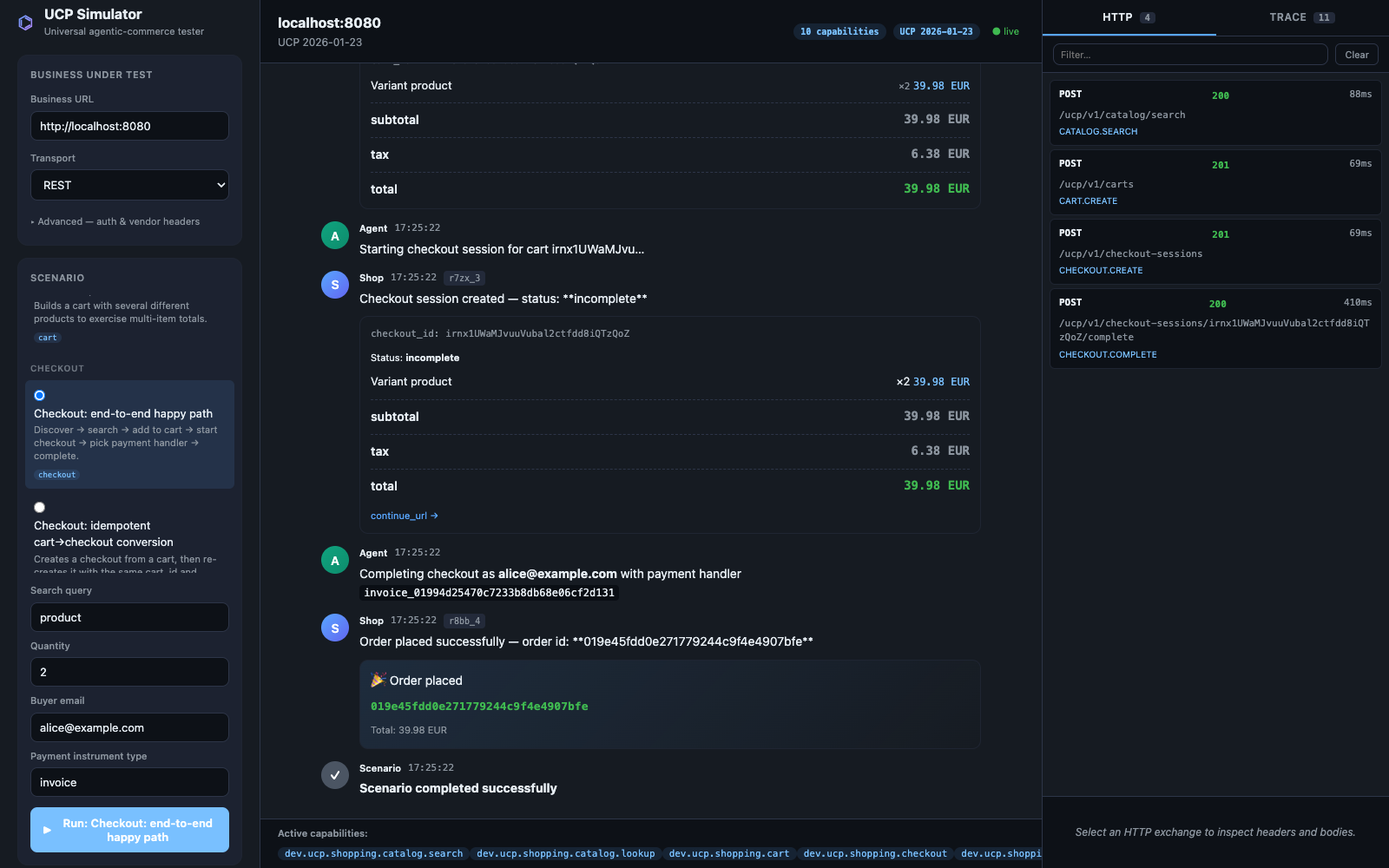
If your handler is missing from the profile, the simulator falls back
to the bundled com.shopware.invoice handler (which always works) so
the rest of the flow continues to be testable.
3.6 PCI scope reminder
Implementing UcpPaymentHandlerInterface does not put your plugin
or your shop into PCI scope on its own — the platform tokenizes
credentials with the PSP before they reach Shopware. As long as
your handler only ever sees an opaque token, you stay out of PCI-DSS
scope. The exception is tokenize() — if you implement it, you're
processing raw credentials and PCI scope applies to the code path that
calls the PSP. Most plugins choose not to implement tokenize() and
let the platform tokenise client-side.
→ Next: AP2 mandates plugin integration